> ## Documentation Index
> Fetch the complete documentation index at: https://docs.scripe.io/llms.txt
> Use this file to discover all available pages before exploring further.
# Set Tone of Voice Guidelines
Keep every post across your team consistent with your company’s communication style.
This feature is only available on the Business Plan.
The Workspace Tone of Voice lets you define writing rules that automatically apply to all personal brands in your workspace — ensuring every message sounds aligned and on-brand.
### Step 1: Set Your Workspace Guidelines
In the Workspace Guidelines field, add your company’s tone of voice rules: including both the *Do’s* and *Don’ts* for how your team should write.
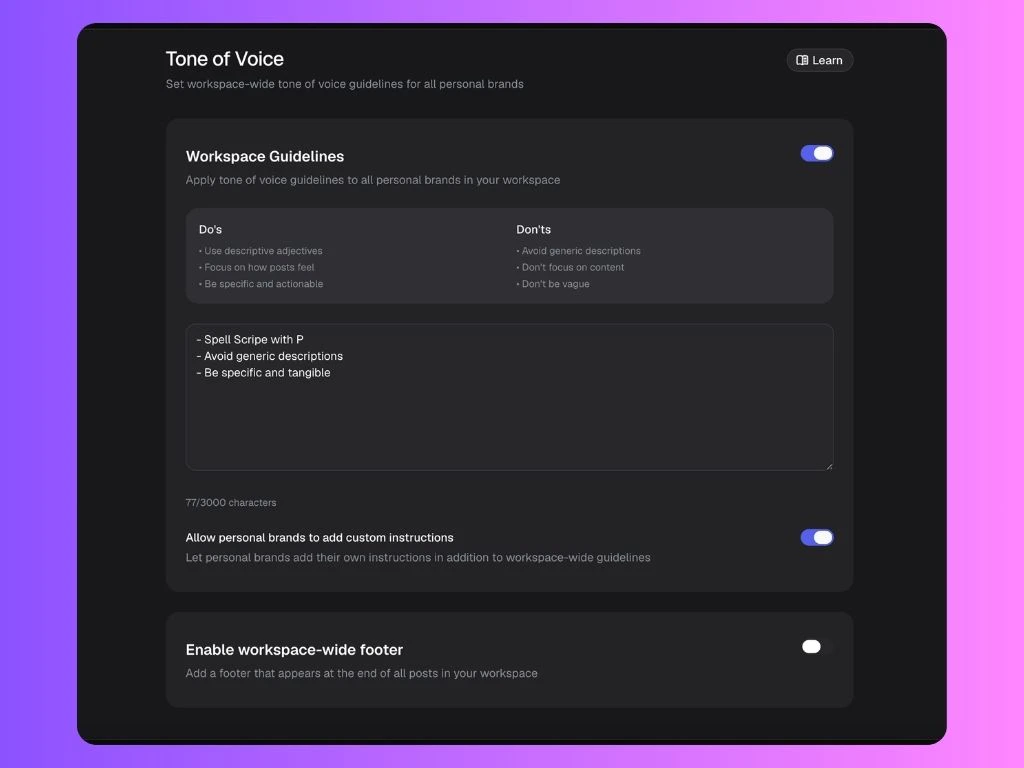 Keep it clear and actionable so everyone understands what good communication looks like.
**Examples:**
* Spell Scripe with P
* Avoid generic descriptions
* Be specific and tangible
**Important:** Everything you add to this field will also appear on each Personal Brand’s Tone of Voice page.
You can use up to **2000 characters** for detailed brand writing rules, but we recommend keeping it simple and fine-tuning the tone later within each Personal Brand.
### Step 2: Allow Personal Brands to Add Their Own Touch
Below your workspace guidelines, you’ll find the option:
> **Allow personal brands to add custom instructions**
* If this is **enabled**, individuals in your workspace can add their own style preferences — but Scripe will always respect your company guidelines first.
* If it’s **disabled**, all posts will strictly follow the workspace tone.
**Recommended:** Keep this turned **on** to maintain brand consistency while allowing each individual to sound themselves authentically.
You can send [this guide](/sidebar/tov) to your team members on how to set up the Tone of Voice inside their Personal Brands.
### Step 3: Add a Workspace-Wide Footer (Optional)
You can also activate a workspace-wide footer that automatically appears at the end of every post created within your workspace.
**Examples:**
* “Powered by Scripe 💜”
* “Opinions are my own, but powered by our team spirit.”
* “We’re hiring! Check careers at...”
This helps unify all team posts with a small branded signature.
Keep it clear and actionable so everyone understands what good communication looks like.
**Examples:**
* Spell Scripe with P
* Avoid generic descriptions
* Be specific and tangible
**Important:** Everything you add to this field will also appear on each Personal Brand’s Tone of Voice page.
You can use up to **2000 characters** for detailed brand writing rules, but we recommend keeping it simple and fine-tuning the tone later within each Personal Brand.
### Step 2: Allow Personal Brands to Add Their Own Touch
Below your workspace guidelines, you’ll find the option:
> **Allow personal brands to add custom instructions**
* If this is **enabled**, individuals in your workspace can add their own style preferences — but Scripe will always respect your company guidelines first.
* If it’s **disabled**, all posts will strictly follow the workspace tone.
**Recommended:** Keep this turned **on** to maintain brand consistency while allowing each individual to sound themselves authentically.
You can send [this guide](/sidebar/tov) to your team members on how to set up the Tone of Voice inside their Personal Brands.
### Step 3: Add a Workspace-Wide Footer (Optional)
You can also activate a workspace-wide footer that automatically appears at the end of every post created within your workspace.
**Examples:**
* “Powered by Scripe 💜”
* “Opinions are my own, but powered by our team spirit.”
* “We’re hiring! Check careers at...”
This helps unify all team posts with a small branded signature.