> ## Documentation Index
> Fetch the complete documentation index at: https://docs.scripe.io/llms.txt
> Use this file to discover all available pages before exploring further.
# Inspiration
The **Inspiration** page in Scripe is your personal feed of high-performing LinkedIn content.
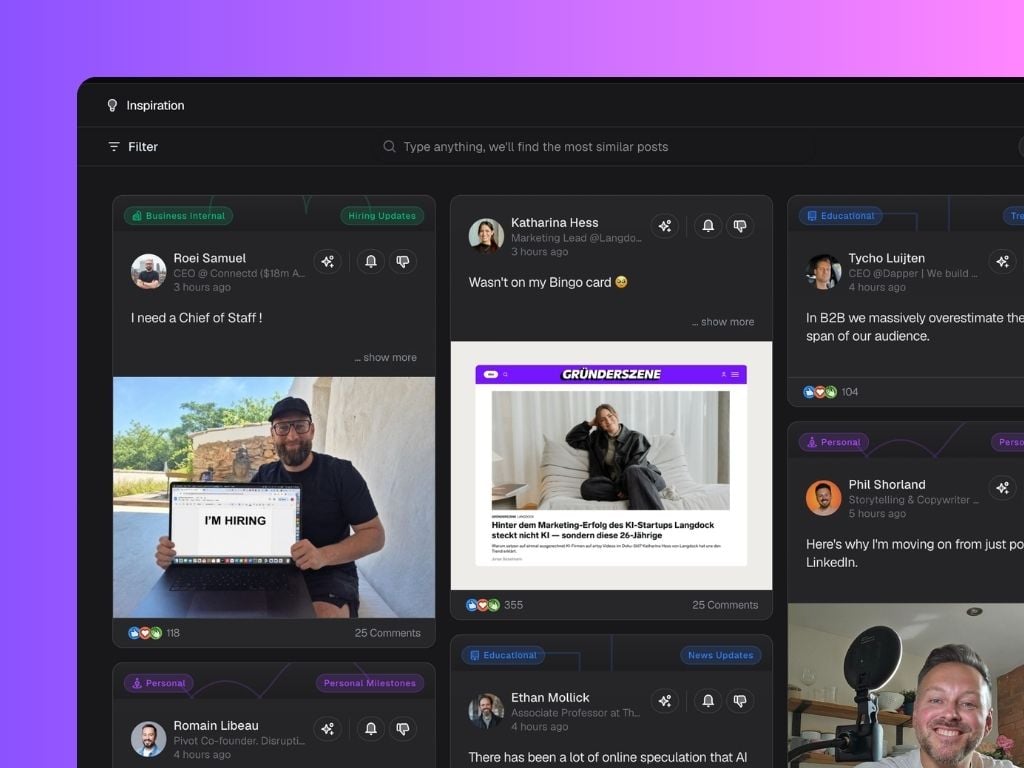 When you follow a creator by clicking the bell icon, Scripe will continue showing their content in your Inspiration Feed. You can unfollow them anytime to stop seeing their content there.
Click the sparkly icon on any post to instantly repurpose it into a post draft you can customize.
A powerful search bar that lets you find *anything* on LinkedIn. Type in any word, phrase, or even a profile name and we’ll instantly show you the most relevant, high-performing posts.
Filter by language, industry, engagement, content types, and post formats. Sort between Newest, Relevance or Engagement to find content that fits your research goals.
When you follow a creator by clicking the bell icon, Scripe will continue showing their content in your Inspiration Feed. You can unfollow them anytime to stop seeing their content there.
Click the sparkly icon on any post to instantly repurpose it into a post draft you can customize.
A powerful search bar that lets you find *anything* on LinkedIn. Type in any word, phrase, or even a profile name and we’ll instantly show you the most relevant, high-performing posts.
Filter by language, industry, engagement, content types, and post formats. Sort between Newest, Relevance or Engagement to find content that fits your research goals.