> ## Documentation Index
> Fetch the complete documentation index at: https://docs.scripe.io/llms.txt
> Use this file to discover all available pages before exploring further.
# Quick Create
Quick Create allows you to instantly create a new post idea without using the chat.
You can access it by clicking the small **feather icon** next to your workspace name in the top-left corner of the dashboard.
Once opened, Quick Create gives you two options:
* quickly generate a post from text, thoughts, or rough ideas
* create an empty post to work on manually later
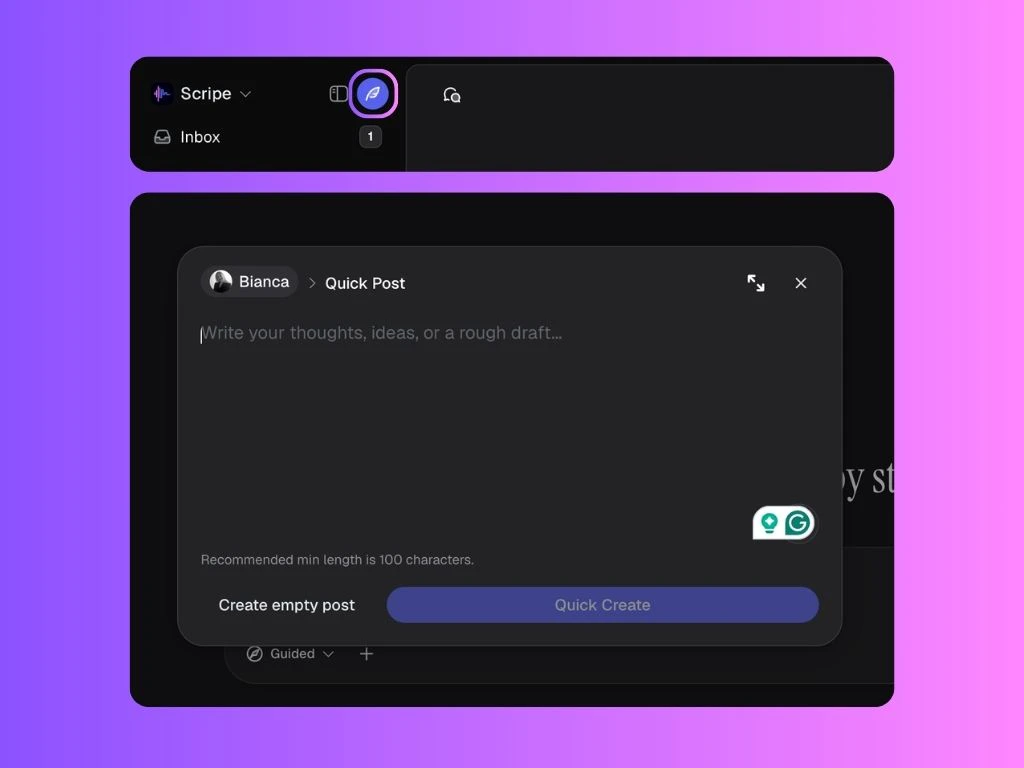 ## Create a Post from Text
Inside the Quick Create window, you can type:
* rough thoughts
* post ideas
* notes
* frameworks
* partial drafts
* random brainstorms
You do not need perfectly written text — even rough notes or unfinished thoughts work.
Scripe will then turn your input into a post draft.
## Create an Empty Post
If you prefer starting completely from scratch, you can click **Create empty post**.
This opens a blank post editor where you can manually write, edit, and develop your content yourself.
## Create a Post from Text
Inside the Quick Create window, you can type:
* rough thoughts
* post ideas
* notes
* frameworks
* partial drafts
* random brainstorms
You do not need perfectly written text — even rough notes or unfinished thoughts work.
Scripe will then turn your input into a post draft.
## Create an Empty Post
If you prefer starting completely from scratch, you can click **Create empty post**.
This opens a blank post editor where you can manually write, edit, and develop your content yourself.