> ## Documentation Index
> Fetch the complete documentation index at: https://docs.scripe.io/llms.txt
> Use this file to discover all available pages before exploring further.
# Client Dashboard
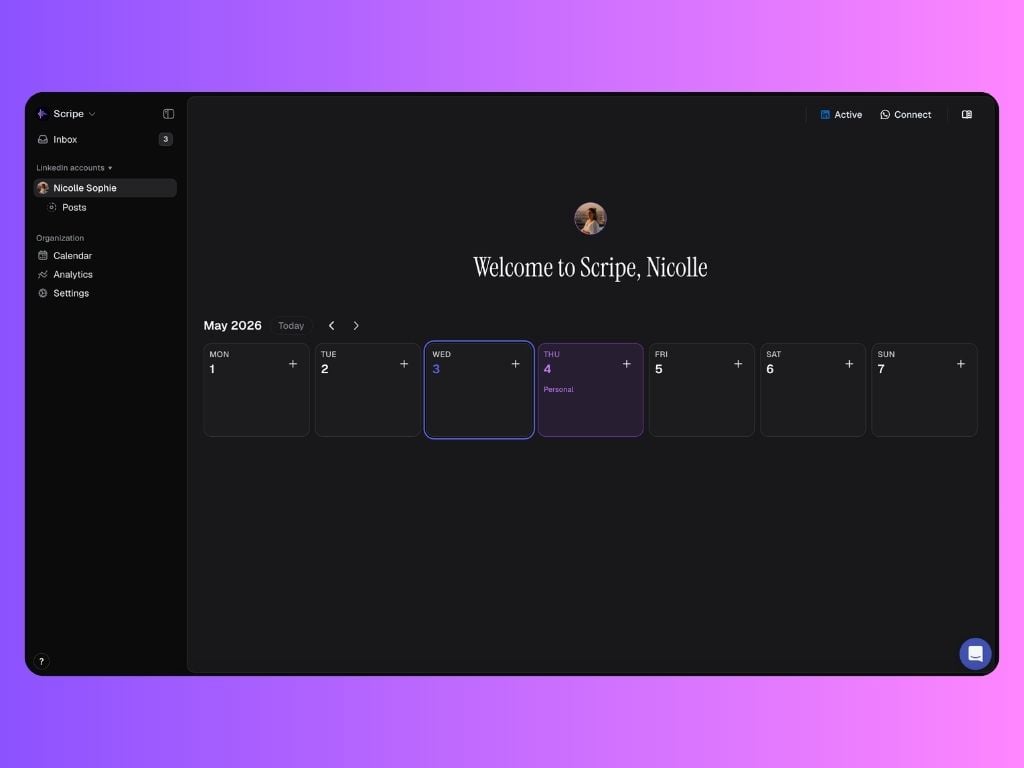
The **Client Dashboard** in Scripe is a **limited workspace** designed for clients who need visibility into content progress and results — without editing or publishing access.
It’s ideal for agencies, consultants, and internal teams who want to keep stakeholders informed while maintaining full control over execution.
 ## What clients can access:
Clients have access to a **limited set of features**, focused on transparency and review:
### **Posts**
Clients can view posts in **three states only**:
* In Review
* Scheduled
* Published
Within Posts, clients can:
* Read all assigned post drafts
* See which users are assigned as reviewers
* Request reviews from other workspace members
Clients **cannot**:
* Create posts
* Edit content
* Publish or schedule posts
### **Calendar**
The Calendar works the same as for other users, with one key difference:
**Clients can:**
* View posting days and planned content **only for posts with the following statuses:**
* In Review
* Scheduled
* Published
* See and comment on **campaigns** on the calendar
**Clients cannot:**
* Edit campaigns
* Change schedules
* Move or reschedule posts
This keeps planning transparent without breaking execution flow.
### **Analytics**
Clients see the **same Analytics view as any personal brand**. Analytics are **view-only** and give clients a clear understanding of content impact.
### **Inbox**
The Inbox is used for **review management only**.
Clients can:
* See posts assigned to them for review
* Receive review notifications inside Scripe
### **WhatsApp**
Clients can connect **their own WhatsApp account** to Scripe (top-right corner).
This allows them to:
* Send voice notes
* Share raw ideas or updates
* Submit audio content for the team to turn into posts
This is especially useful for [async collaboration](/collaborations/async) and idea capture.
## Settings access:
### Account
* **Profile:** View and manage their own profile details
* **Security & Access:** Manage login and security settings
* **Referrals:** Access the referral program & earn money by referring Scripe
### Workspace
* **General:** View organization information & leave the organization if needed
* **Billing:** 🔒 Locked (no access)
* **Notifications:** Manage notification preferences
* **Tone of Voice:** 🔒 Locked (no access)
### Personal Brands:
Clients can see a list of all personal brands connected to the workspace.
* Other brands appear as locked 🔒
* Clients can see the names only
* They cannot access or interact with those brands
## What clients can access:
Clients have access to a **limited set of features**, focused on transparency and review:
### **Posts**
Clients can view posts in **three states only**:
* In Review
* Scheduled
* Published
Within Posts, clients can:
* Read all assigned post drafts
* See which users are assigned as reviewers
* Request reviews from other workspace members
Clients **cannot**:
* Create posts
* Edit content
* Publish or schedule posts
### **Calendar**
The Calendar works the same as for other users, with one key difference:
**Clients can:**
* View posting days and planned content **only for posts with the following statuses:**
* In Review
* Scheduled
* Published
* See and comment on **campaigns** on the calendar
**Clients cannot:**
* Edit campaigns
* Change schedules
* Move or reschedule posts
This keeps planning transparent without breaking execution flow.
### **Analytics**
Clients see the **same Analytics view as any personal brand**. Analytics are **view-only** and give clients a clear understanding of content impact.
### **Inbox**
The Inbox is used for **review management only**.
Clients can:
* See posts assigned to them for review
* Receive review notifications inside Scripe
### **WhatsApp**
Clients can connect **their own WhatsApp account** to Scripe (top-right corner).
This allows them to:
* Send voice notes
* Share raw ideas or updates
* Submit audio content for the team to turn into posts
This is especially useful for [async collaboration](/collaborations/async) and idea capture.
## Settings access:
### Account
* **Profile:** View and manage their own profile details
* **Security & Access:** Manage login and security settings
* **Referrals:** Access the referral program & earn money by referring Scripe
### Workspace
* **General:** View organization information & leave the organization if needed
* **Billing:** 🔒 Locked (no access)
* **Notifications:** Manage notification preferences
* **Tone of Voice:** 🔒 Locked (no access)
### Personal Brands:
Clients can see a list of all personal brands connected to the workspace.
* Other brands appear as locked 🔒
* Clients can see the names only
* They cannot access or interact with those brands